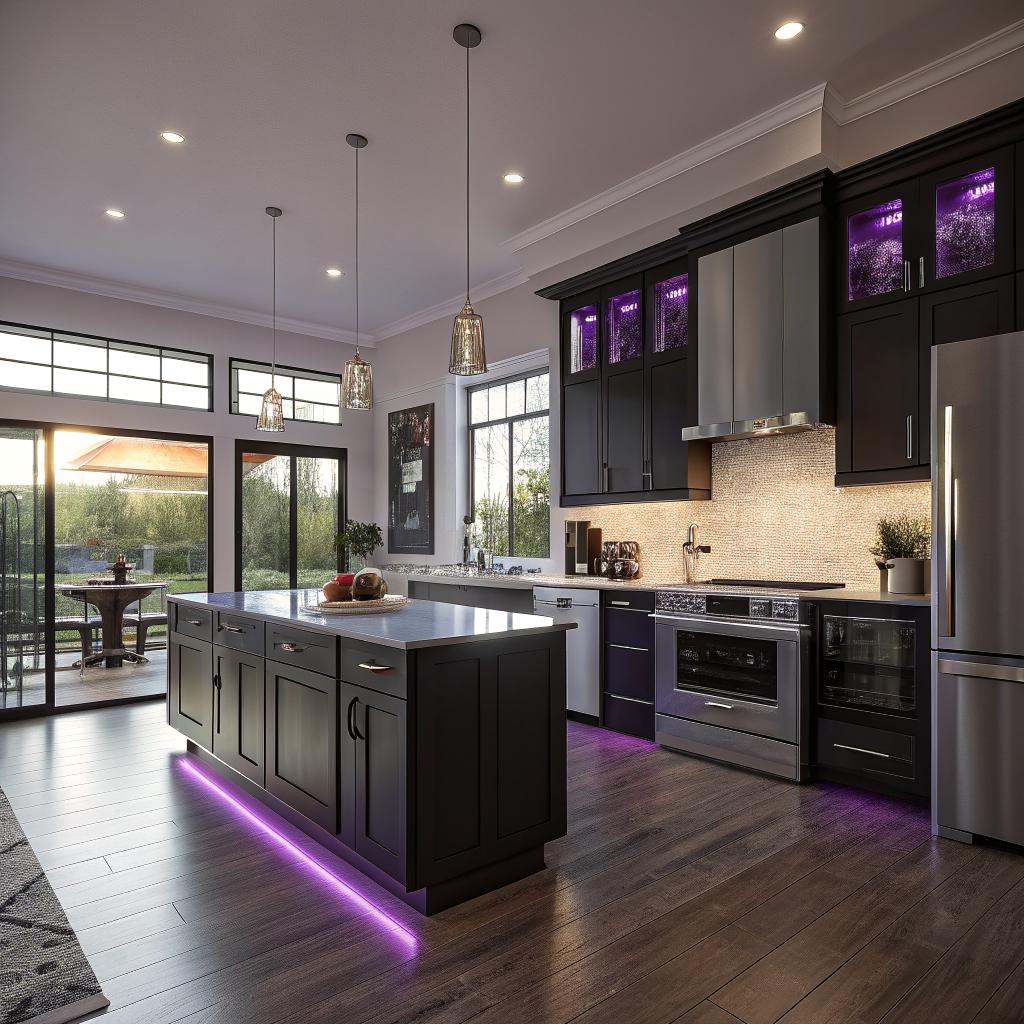
I used to think a smart kitchen was just a fridge with a screen and a speaker that tells you the weather. Then I started looking at what people in Lexington are actually doing with tech in their kitchens, and it is a lot more practical than I expected.
If you want a smart kitchen in Lexington, the short answer is this: focus your remodel on better wiring and outlets, strong Wi‑Fi, a few key smart appliances, and a layout that supports screens, sensors, and charging without turning your counters into a cable pile. A local contractor who understands both tech and building codes for kitchen remodeling Lexington KY can help you hide the tech where it makes sense and keep things simple enough that anyone in the house can still cook without reading a manual.
Why a smart kitchen in Lexington feels different
Lexington is not New York or San Francisco. Kitchens here have to deal with humidity, older brick homes, horse farm dust tracking in, and a lot of family traffic. You might also be juggling remote work, kids, and someone who still likes to cook on cast iron the old way.
This means a smart kitchen here should not be a showroom with glowing blue LEDs. It should be:
- Easy to clean
- Stable when the power blips for a moment in a storm
- Friendly for guests who have no idea how your tech works
- Comfortable for both heavy cooking and quick meals
I will walk through how to think about wiring, layout, smart devices, and even privacy. Some of it might feel too cautious, but that is often what saves you from spending money on tech that ends up in a drawer.
Start with the tech backbone: power, Wi‑Fi, and safety
Most smart kitchen projects fail quietly at the boring level: weak Wi‑Fi, not enough outlets, and messy cable runs. The gadgets are not the hard part. The unseen stuff is.
Power planning that does not look ugly later
If your home is older, there is a fair chance your current kitchen wiring is not ready for a fridge with a computer in it, a smart oven, induction cooktop, plus a row of chargers and smart lights.
Some key questions to walk through with your contractor and, if you have one, your electrician:
- How many dedicated circuits do your major appliances need now and in the next 10 years?
- Where will you want hidden outlets for things like smart speakers, hubs, and cameras?
- Do you want USB‑C or just standard outlets, and how many?
- Where can you add under‑cabinet or in‑drawer outlets so cords stay off the counters?
If you only remember one rule for smart kitchen power, make it this: plan outlets and circuits for devices you have not bought yet.
A few practical placements that work well in tech‑heavy kitchens:
- Outlet behind the fridge at the correct height, so plugs do not bend
- Two or more circuits for countertop outlets if you use multiple big appliances at once
- Pop‑up outlets in the island that sit flush when not in use
- At least one outlet in a pantry or appliance garage for routers, hubs, or a small server or NAS
GFCI and AFCI rules are strict in kitchens for a reason. If you push for weird custom placements or overlook these, you might end up redoing work when an inspector flags it. That is one of those cases where trying to be too clever with tech can backfire.
Strong Wi‑Fi where you actually cook
Smart fridges, displays, speakers, plugs, and sensors all rely on decent Wi‑Fi. Thick walls and old ducts in many Lexington homes do not help.
Consider:
- Running Ethernet from your main router to an access point near or in the kitchen
- Designing a small shelf or cabinet space for networking gear, with ventilation
- Keeping major metal appliances from blocking your access point
If you use a mesh system, decide where the nodes will sit early. It affects outlet placement and can even affect where you place a cabinet or tall pantry.
Your smart kitchen is only as reliable as its Wi‑Fi and wiring, not the brand name on the fridge.
Smart layout: where tech and cooking meet
Traditional kitchen design talks about the work triangle: sink, stove, fridge. With tech, it becomes more like a web: screens, sound, sensors, and power all tied into how you move.
Where do screens actually belong?
Many tech‑focused remodels start with a dream of a giant screen in the kitchen. Then nobody uses it, because it is in an awkward spot or always covered in grease.
Ask yourself:
- Do you watch recipe videos while cooking or mostly check quick timers and notes?
- Do you want a permanent screen, like a wall‑mounted tablet, or prefer to dock your phone?
- Who else will use it, and are they comfortable with apps and voice controls?
Common screen placements that work well:
- A small tablet tucked under an upper cabinet near the main prep area
- A smart display near the coffee area for news, timers, and smart home control
- A discreet wall‑mounted tablet by the entrance to control lights, climate, and cameras
Some people like a smart fridge screen. I am a bit skeptical. Refrigerator platforms age fast, and you might not want your shopping lists tied to one vendor. A cheap wall tablet you can replace in 3 years is less risky.
Zones for people, not just for appliances
Think about your kitchen in zones:
- Cooking zone
- Prep zone
- Cleaning zone
- Snack and coffee zone
- Work or homework zone if people sit at the island
Now layer tech on top:
- Cooking zone: smart range, smart oven, sensor on range hood, voice control nearby
- Prep zone: task lighting you can dim, maybe a screen for recipes, easy access to timers
- Cleaning zone: smart dishwasher, leak sensors near sink and dishwasher
- Snack/coffee: smart plugs for kettle or coffee machine, small display or speaker
- Work zone: outlets, USB‑C charging, maybe a small drawer with cable organizers
If you plan your zones first, it is easier to see which smart features help daily life and which are just toys.
Smart appliances worth considering in Lexington
Not every appliance gains much from being “smart”. For example, a smart toaster is, in my view, a waste. But some devices really do save time or reduce stress.
Here is a simple table to keep things grounded:
| Appliance | Smart features that actually help | What to watch for |
|---|---|---|
| Range / cooktop | Remote preheat, safety shutoff, temp sensors, induction control | App reliability, clear manual controls if Wi‑Fi fails |
| Wall oven | Cooking presets, remote status, temp probes | Do presets match how you cook, or do they feel gimmicky? |
| Refrigerator | Door alerts, temp monitoring, energy tracking | Screen longevity, cost of repairs, network bloat |
| Dishwasher | Cycle alerts, leak alerts, delayed runs in off‑peak hours | Noise levels, real cleaning performance |
| Range hood | Auto on with cooktop, fan speed based on heat or smoke | Can you still control it manually fast? |
| Coffee / beverage | Scheduled brewing, temp control, reminders | Does your household actually use schedules? |
Smart ovens and ranges
If you only pick one major smart appliance, I think the oven or range is the best candidate.
Useful features:
- Remote preheat while you are on the way home
- Temperature probes tied to the app with alerts
- Safety lockout if something is left on too long
- Integration with voice assistants for timers and modes
The concern I often hear is: “What if the cloud service dies?” That is fair. Look for models with solid local controls and that do not require an account for basic use. Smart should mean extra options, not dependence.
Refrigerators and the real value they bring
The big smart screens on fridges look nice in ads. In daily life, the most useful features are usually less visible:
- Door open alerts on your phone
- Temperature and humidity tracking
- Power outage notices if it senses a change
In Lexington, where storms can knock out power, an alert when the fridge warms past a safe point is more helpful than a slideshow on the door.
If you care about repair costs and long‑term reliability, you might choose a “moderately smart” fridge: connected, but not overloaded with extra systems to fail.
Smart dishwashers and leak protection
Water damage in a kitchen is expensive. If you are already remodeling, it is worth putting in:
- A smart dishwasher that can alert you to leaks or blocked filters
- Simple leak sensors under the sink and near the dishwasher
That combination is not flashy, but when a hose fails or a fitting loosens, you will be glad you did not just focus on fancy lighting.
Lighting: the cheapest way to make your kitchen feel “smart”
Lighting is where tech can be fun without being fragile. It also changes how your kitchen feels more than any other smart feature.
Layered lighting with simple controls
Think in layers:
- Overhead lighting for general brightness
- Under‑cabinet for tasks
- Accent lighting for style and night use
Then decide how you want to control it:
- Hardwired smart switches that work like normal switches
- Smart bulbs in places where you want fine color and brightness control
- Voice control for hands‑full cooking moments
A common mistake is putting everything on smart bulbs controlled only by apps. When a guest or family member hits the wall switch, the bulbs lose power, and nothing works until someone opens the app again.
A more reliable style is:
- Smart switches for key zones
- Dumb bulbs for most fixtures
- Smart bulbs only where color or scenes really matter, like accent strips
Practical scenes that you might actually use
Think less about rainbow colors, more about routines:
- “Morning”: bright, cooler white at the island and coffee zone
- “Cooking”: strong under‑cabinet lights, moderate overhead, minimal accent
- “Dinner”: softer, warmer tones, island lights lower
- “Night”: floor‑level or toe‑kick lights at very low brightness
In Lexington winters, with shorter days, a good morning scene can really help your mood. It is a small thing, but it adds up when you use it every day.
Storage and hidden tech: where to put the “brains”
Many smart kitchens look cluttered because the hub, router, chargers, and cables are all on open counters. Good storage design can hide that.
Appliance garages and charging drawers
An appliance garage is a cabinet section with a roll‑up or flip‑up door and outlets inside. It is ideal for:
- Smart speakers or displays
- Coffee machines and kettles
- Toasters and blenders
Charging drawers can hold:
- Phones and tablets
- Battery packs
- Headphones
Just remember:
- Ventilation if you keep routers or hubs inside
- Short charging cables so the drawer can close
- Labels on ports, so guests do not unplug the wrong thing
It is easy to overdo this part and create a drawer full of mystery cables. Keep it simple.
Where your smart home hub and router should live
If your entire house runs on a central hub or main router, think twice before hiding it deep behind heavy appliances.
Good spots:
- Pantry shelf with a small vented door
- Upper cabinet with a mesh or slatted front
- Wall panel at the edge of the kitchen, away from heavy metal blocks
Less ideal:
- Behind the fridge
- Under the sink (too much risk of leaks)
- Inside a sealed solid wood cabinet
Voice control, automations, and actual daily habits
On paper, automations sound perfect. In real life, they only work if they match your habits and everyone in the house tolerates them.
Where voice control helps and where it annoys
Good uses of voice in a kitchen:
- Setting timers while your hands are dirty
- Adjusting lights while carrying groceries
- Checking if the oven is on from another room
- Adding simple items to a shared grocery list
Less good uses:
- Complex recipe step navigation that is slower than glancing at a screen
- Fine volume control on music while everyone is talking
Before you design mounts for three smart speakers, ask yourself how much your household already uses voice in other rooms. If nobody is comfortable talking to devices in the living room, that will not magically change in the kitchen.
Simple automations that tend to stick
Automations that rely on clear triggers tend to survive past the first month.
Some examples:
- Kitchen lights turn on to a set level when motion is detected in the morning
- Range hood auto starts when the cooktop reaches a set temperature
- Under‑cabinet lights turn on when the main overhead lights turn off
- Leak sensor near the dishwasher triggers an alert and maybe flashes a nearby light
Be careful with presence detection. If your kitchen is open to other spaces, motion sensors can misfire when someone just walks through. Sometimes a simple schedule and manual override switch is more reliable than a clever automation.
Energy, comfort, and the Kentucky climate
Smart kitchens in Lexington are not only about convenience. They can help with comfort through hot summers and somewhat unpredictable shoulder seasons.
HVAC, fans, and sensors around the kitchen
Cooking heats a room quickly. If your thermostat is down the hall, it may not account for how hot the kitchen gets.
If you are already remodeling, think about:
- A smart thermostat with a remote sensor near the kitchen
- Smart or at least controllable ceiling fans in adjacent spaces
- Temperature and humidity sensors inside the pantry
These let you tune comfort without blasting the whole house AC just because you roasted a chicken.
Energy tracking for people who like numbers
If you enjoy data, you might appreciate:
- Smart plugs for small appliances to see usage patterns
- Smart panel or energy monitor to see what the oven and fridge draw over time
Do you need this to cook? Not at all. But if your utility costs are creeping up, it can show you if an old second fridge in the garage is actually the problem, not the fancy new induction cooktop.
Privacy, security, and keeping things sane
A smart kitchen is full of mics, cameras, and networked devices. For a tech‑interested audience, this is not shocking, but it still deserves thought.
Devices with cameras and mics
Common spots where cameras show up:
- Smart displays in the kitchen
- Indoor security cameras pointing toward external doors
Ask yourself:
- Do you really need a camera on your kitchen display, or would a camera‑free model be fine?
- Are you comfortable with a view of part of the kitchen on your home security app?
For mics:
- Use hardware mute buttons when you have people over if they are not comfortable
- Avoid placing smart speakers near windows where outside conversations might be heard
If that sounds paranoid, consider that not everyone visiting your home shares the same comfort level with always‑listening devices.
Network security basics for a smart kitchen
Nothing fancy here, just good habits:
- Use a guest network for appliances and IoT devices
- Change default passwords
- Update firmware on a regular schedule, maybe once a month or quarter
If your remodel includes a new router spot in the pantry, take that chance to clean up your network plan at the same time. It is dull, but it affects every tech feature you install.
Working with Lexington contractors who actually “get” tech
This part might feel a bit awkward, but it matters more than people think. Many remodelers are great at cabinets and tile but have limited experience with network gear or smart appliances. Some are the opposite, very tech‑savvy but weak on code and finish work.
When you talk to contractors in Lexington, you might ask:
- Have you installed smart switches and smart appliances before?
- How do you handle coordination between the electrician, the cabinet person, and the low‑voltage wiring?
- Are you comfortable making small access panels for future wiring or hub changes?
Watch out for anyone who just says “we will figure it out later” on wiring for tech. Later usually means cut drywall, dust, and extra cost.
A good smart kitchen is not about having the most gear. It is about having a contractor who respects both the tech and the carpentry.
A quick mental checklist before you settle on a design
Let me challenge the usual “just add smart gadgets” mindset a bit. Before you sign off on your plan, walk through this checklist in your head, or frankly, on paper.
Questions worth asking yourself
- Can every older adult in your family still use the kitchen if every smart feature fails?
- Are there at least a few things that work fully offline, without apps?
- Do you have a plan for replacing devices in 3 to 7 years without tearing into walls?
- Will you still like this setup if you move and rent the house to someone less tech‑savvy?
- Are you picking devices that work with more than one platform, not locked to one vendor?
If some of these answers worry you a little, that might be a sign you are leaning too hard into tech for its own sake.
Example smart kitchen flow for a normal day
To make this less abstract, here is how a typical day might feel in a well‑planned smart kitchen in Lexington.
Morning
You walk in, motion sensors bring up a “morning” scene. Under‑cabinet lights glow softly, and the island lights rise enough to read. A smart plug has already switched on the coffee machine at your usual time.
You ask the display for the weather and a quick traffic check before heading toward New Circle or downtown. A phone on the charging shelf shows 100 percent, so you grab it and go.
Afternoon / work from home
Someone uses the island as a work zone. There are outlets and USB‑C ports right where they sit, so no cables stretch across the room. The overhead lights shift to a whiter tone. They can join video calls from a laptop, but the router in the pantry keeps a stable connection.
A leak sensor stays silent under the sink while the dishwasher runs a delayed cycle. Nobody thinks about it, which is the whole point.
Evening cooking
You start cooking. The smart range kicks on, and the range hood ramps up when the pan gets hot. You ask the assistant to set two different timers for pasta and sauce. Under‑cabinet lights snap to full brightness, while other lights dim to avoid glare.
Halfway through, you check your phone from the garden. The oven shows 10 minutes left, and the meat probe is approaching target. If a kid left the fridge door open, you would get a fast alert.
Night
Later, a “night” scene turns off everything except a faint toe‑kick light guiding the way to the fridge. The kitchen feels calm, not like a tech lab still buzzing at full brightness.
You plug your phone in the charging drawer. The router and hub in the pantry blink quietly, but your counters are empty. Nothing about this feels flashy, yet almost every part of the day was touched by the smart features you planned during the remodel.
Common mistakes people make with smart kitchens
It might help to look at where people often go wrong. Some of this is harsh, but it is honest.
Buying gadgets before planning the space
People fall in love with a specific fridge or range, then discover it does not fit the rough‑in, local supply, or venting setup. It is better to map your tech needs first, then pick matching hardware.
Relying only on wireless everything
Wi‑Fi is convenient, but heavy traffic, thick walls, and interference are real. If you are remodeling anyway, run Ethernet to at least one access point near the kitchen. You will not regret it.
Building a system that only one person understands
This is common in tech‑heavy households. One person runs the smart home. Everyone else is lost when that person travels.
Try this:
- Make sure every key function has a simple physical backup: switches, knobs, manual controls
- Write a short “kitchen tech cheat sheet” and tape it inside a pantry door
If that sounds overkill now, you will change your mind when a guest house‑sits while you are away.
Is a smart kitchen in Lexington actually worth the remodel?
If your current kitchen is fine structurally, you might wonder if this level of planning is worth it. That is a fair question.
A full remodel is not only about tech. You might need new cabinets, better insulation, window changes, and updated plumbing anyway. Tech can either ride along with that work, or be something you bolt on later.
My honest view:
- If your cabinets, wiring, and layout are already strong, you can add a lot of smart features without a full remodel.
- If your kitchen is due for serious work, it would be a mistake not to plan for smart features at the same time.
The big value is not in voice commands or glowing strips of light. It is in wiring, layout, and small sensors that quietly prevent problems or save time. Those are easier and cheaper to add while walls are open and cabinets are going in.
Q & A: A few final questions you might still have
Q: What if I do not want my whole kitchen online?
A: That is a valid choice. You can still wire for extra outlets, add better lighting, and run Ethernet without connecting every device to the internet. Pick a few key smart features, like leak sensors and smart switches, and keep the rest offline if that feels better.
Q: Is induction cooking worth planning the electrical work around?
A: For many tech‑interested cooks, yes. Induction offers fine control, is safer for kids, and respects energy use. It does mean planning for the right circuit and sometimes new cookware, but during a remodel, that extra planning is easier than later.
Q: How future‑proof can a smart kitchen in Lexington really be?
A: Not perfectly. Platforms change, and some brands disappear. What you can do is future‑proof the bones: strong electrical, Ethernet where it matters, roomy conduits, and flexible storage for hubs and routers. The specific devices can come and go, but the infrastructure will keep supporting new hardware for many years.