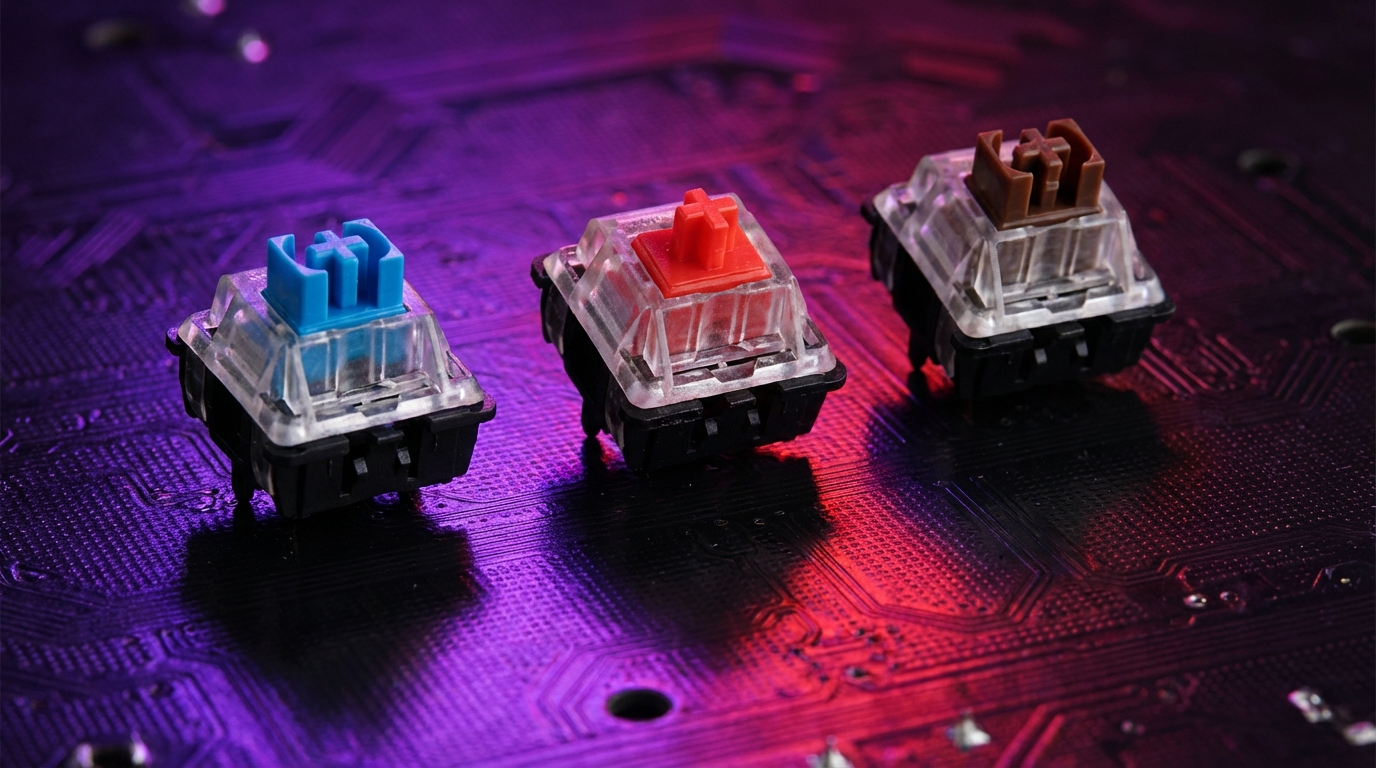
I used to think all mechanical keyboards felt the same. Then I bought one with blue switches for “productivity” and my entire office wanted to uninstall me.
Here is the short version: Blue switches are loud, clicky, and good for heavy typists who like clear feedback. Red switches are light, smooth, and great for fast typing or gaming. Brown switches sit in the middle, with a gentle bump that gives some feedback without the click. If you are not sure what you want, start with browns.
What a keyboard switch actually does (and why it matters)
When you press a key on a mechanical keyboard, you are not just moving a piece of plastic. Under each keycap there is a physical switch that controls how the key feels and sounds.
Every switch has a few basic traits:
- Actuation force: How hard you need to press before the key press is registered.
- Travel distance: How far the key moves from top to bottom.
- Tactility: Whether you feel a bump or not while pressing the key.
- Sound profile: How loud and what kind of sound it makes.
The switch under each key has more impact on your experience than the keyboard brand, RGB lighting, or fancy marketing terms.
The color labels like “blue”, “red”, and “brown” usually refer to Cherry MX switches or clones that copy their feel. Brands like Gateron, Kailh, Outemu, and many others use the same color codes most of the time, but the exact feel can still vary a bit.
Here is the tricky part: all three switch types will let you type and play games. None of them is “wrong”. The difference is in comfort, sound, and how easy it feels to type accurately.
The three big families: linear, tactile, and clicky
Before going into blue vs red vs brown, it helps to group them by behavior.
- Linear switches: Smooth from top to bottom, no bump, no click (reds are the classic example).
- Tactile switches: Have a small bump that tells you “key press registered” without loud noise (browns fall here).
- Clicky switches: Have both a bump and a distinct click sound (blues are the usual example).
Think of linears as “silent and smooth,” tactiles as “subtle feedback,” and clicky switches as “feedback with a loud personality.”
Now let us break down each of the three: blue, red, and brown.
Blue switches: loud, clicky, and very opinionated
I bought my first blue switch keyboard thinking, “If I hear a click, I will type faster.” I did type more confidently. But I also sounded like I was trying to send Morse code through the desk.
How blue switches feel and sound
Blue switches are:
- Clicky: There is a clear click sound when the key actuates.
- Tactile: There is a noticeable bump in the key travel.
- Heavier: You need more force to press them compared to reds.
A typical Cherry MX Blue style switch has:
| Property | Typical Blue Switch |
|---|---|
| Switch type | Clicky, tactile |
| Actuation force | About 50-60 g |
| Total travel | About 4.0 mm |
| Actuation point | About 2.0 mm |
| Sound level | High (very audible click) |
The sound comes from an internal mechanism that snaps when the key passes the actuation point. You feel and hear that snap.
Who blue switches are good for
Blue switches work well if:
- You love audible feedback and want each key press to “confirm” itself.
- You type a lot of text, code, or documents and do not mind the noise.
- You work alone or in a space where no one else will be disturbed.
Many people who switch from laptop keyboards to mechanical ones feel very “at home” on blues because the click gives them confidence they have pressed the key.
If you like the sound of an old style office keyboard and you find it satisfying rather than annoying, blue switches will probably feel familiar.
Where blue switches cause problems
Now for the downside.
- Noise: The click is loud enough to be picked up in meetings and voice chats.
- Fatigue: The higher force can tire your fingers during long sessions if you are not used to it.
- Gaming: Some players find the extra resistance and tactile click slows rapid key spam.
If you work in a shared office, open workspace, or even at home with someone nearby, blue switches can become a source of complaints.
I have seen more than one person return a blue switch keyboard simply because their teammates or family could hear every key press through walls and microphones.
Best use cases for blue switches
Blue switches make the most sense when:
- Your focus is heavy typing, writing, or coding.
- You want strong feedback and do not care about quiet.
- You mostly work solo and use push-to-talk for voice calls, if at all.
If your priority is gaming or quiet, blues are usually not the best pick.
Red switches: smooth, light, and favored by gamers
If blue switches feel like a typewriter, red switches feel like skating on glass. No bump, no click, just a clean press.
How red switches feel and sound
Red switches are:
- Linear: There is no bump, the movement is smooth.
- Light: Less force needed to press the key.
- Quieter: No extra click sound, only bottoming out noise.
A typical Cherry MX Red style switch has:
| Property | Typical Red Switch |
|---|---|
| Switch type | Linear |
| Actuation force | About 45 g |
| Total travel | About 4.0 mm |
| Actuation point | About 2.0 mm |
| Sound level | Low to medium (no click) |
Because there is no bump or click, red switches feel quick. The key starts moving, and it just keeps moving until it bottoms out.
Why gamers like red switches
Red switches are a common choice in gaming keyboards. The reasons are practical:
- Fast repeated presses: Less resistance means you can press the same key rapidly with less fatigue.
- Predictable movement: Without tactile bumps, the force is consistent across the stroke.
- Quieter on mic: They are not silent, but they create less sharp noise compared to clicky switches.
Red switches reward a light touch. If you learn not to bottom out every key, they can feel very fast and comfortable.
That said, if you are heavy-handed, you might bottom out hard on every press, which can cause more noise and fatigue.
Who red switches are good for
Reds tend to work well if:
- You play fast-paced games where you need quick, repeated inputs.
- You prefer a smooth, friction free key feel.
- You share your workspace and want to reduce noise compared to clicky switches.
For typing long documents, some people love them, and some feel lost without tactile feedback. This is where preference really kicks in.
Where red switches fall short
There are some trade-offs:
- Less feedback: No bump means you might bottom out more or misjudge actuation at first.
- Typos for beginners: The light force can cause accidental key presses.
- Less “satisfying” for some: If you enjoy pronounced feedback, reds can feel too soft.
If your primary work is writing and you like to feel a clear point where the key “triggers,” reds might feel vague at first.
Best use cases for red switches
Red switches are a strong choice when:
- Gaming is your main use case.
- You type quickly and like light keys.
- You need something quieter than clicky switches but do not want rubber dome mush.
If you tend to hit keys with force or want more control, you may want to look at browns next.
Brown switches: the middle ground that fits most people
Browns are usually my default recommendation. Not because they are perfect, but because they are very hard to dislike.
How brown switches feel and sound
Brown switches sit between clicky and linear:
- Tactile: There is a bump, but softer than blues.
- No added click: You get the bump without the extra click sound.
- Moderate force: Slightly heavier than reds, lighter than many blues.
A typical Cherry MX Brown style switch has:
| Property | Typical Brown Switch |
|---|---|
| Switch type | Tactile (no click) |
| Actuation force | About 45-55 g |
| Total travel | About 4.0 mm |
| Actuation point | About 2.0 mm |
| Sound level | Medium (no click, but you hear bottoming out) |
The tactile bump helps you know when the key press has been registered. You can learn to stop pressing right after the bump, which reduces bottoming out and sound.
Why browns are often recommended first
Browns are popular for mixed use: typing, coding, gaming, and general work.
Here is why:
- Feedback without the noise: You feel the key press without a sharp click.
- Balanced force: Not too heavy, not too light.
- Shared spaces: Quieter than blues, but still satisfying for typing.
If you do not know what kind of switch you like, browns are usually the safest first bet.
They are not the quietest, not the loudest, not the heaviest, and not the lightest. That middle ground actually helps because you can then decide if you want to go lighter (reds) or clickier (blues) in the future.
Where browns might disappoint
Some people describe brown switches as “muddy” or “indecisive.” That is a bit harsh, but I understand where that feeling comes from.
Possible downsides:
- Bump is subtle: If you want a very pronounced tactile feel, browns may seem too soft.
- Not silent: They still create noise from bottoming out and keycap impact.
- Gamers may prefer smoothness: Some players prefer linear switches for consistent force.
So while browns are a good starting point, they are not magical. They just give you a balanced reference.
Best use cases for brown switches
Browns are a solid choice if:
- You split your time between typing and gaming.
- You want some feedback but do not want to annoy coworkers or family.
- You have never tried mechanical keyboards and want a safe first experience.
If you are buying one keyboard and do not want to overthink it, browns are often the least risky option.
Direct comparison: blue vs red vs brown
It helps to see the three side by side.
| Feature | Blue | Red | Brown |
|---|---|---|---|
| Type | Clicky, tactile | Linear | Tactile (no click) |
| Sound level | High (loud click) | Low to medium | Medium |
| Feel | Pronounced bump + click | Smooth, no bump | Gentle bump |
| Actuation force | Medium to high | Low | Low to medium |
| Best for typing | Writers, programmers who love feedback | Fast typists who like smooth keys | General typing, mixed work |
| Best for gaming | Casual, not noise sensitive | Very common gaming choice | Good mixed gaming + typing |
| Office friendliness | Poor | Good | Decent |
The “best” switch is not universal. It is a match between your environment, your hands, and what you actually do most of the day.
How your environment changes the right choice
Your surroundings might matter more than your personal taste.
- Shared office / open space: Prefer reds or browns. Blues tend to cause complaints.
- Home office alone: Any switch is fine. Pick based on your feel preference.
- Streaming / calls: Reds and browns are easier to work with. Blues can overwhelm microphones.
The irony is that people often buy blue switches because they sound nice in a short demo, then realize they hear that same sound for 8 hours a day.
Your typing style matters more than you think
Two people can use the same keyboard and have very different reactions.
Factors that affect the experience:
- Heavy vs light fingers: Heavy typists may find reds too easy to bottom out and prefer browns or blues.
- Resting fingers on keys: If your fingers rest on keys, light switches can trigger accidental presses.
- Touch typing vs hunt-and-peck: Touch typists often appreciate tactile feedback more.
If you tend to pound on your keyboard, you might prefer some resistance and tactility. If your touch is light and controlled, reds can feel great.
Brand differences: not all blues are the same
This can get confusing. Many companies copy Cherry MX switches, but they do not always feel identical.
Common families you will see:
- Cherry MX: The reference standard. Often lasts very long, consistent feel.
- Gateron: Known for smoothness, especially in linear switches.
- Kailh: Has many variants, including box switches with reduced wobble.
- Outemu and others: Often used in budget boards, feel can vary.
Color is a guideline, not a guarantee. A “red” from one brand can feel slightly heavier or smoother than a “red” from another.
You may find that you like “Gateron Reds” but not “Cherry Reds” or the other way around. This is not you being picky. It is normal. The springs, housing, and stem design all shift the feel.
Other variants you might run into
Even if you are focused on blue, red, and brown, you will see:
- Speed switches: Similar to reds but actuate earlier for faster input.
- Silent switches: Extra damping to reduce noise when bottoming out.
- Heavier linears (black switches): Like reds but with higher actuation force.
If this feels like too much choice, that is normal. Start with the basic trio, then experiment later if you want to fine tune.
How to choose: a simple decision path
Instead of getting lost in technical specs, you can walk through a few simple questions.
1. Where will you use the keyboard?
- Shared office / classroom / thin walls:
- Avoid blue switches.
- Pick red if you want smooth and relatively quiet.
- Pick brown if you want feedback but still reasonable noise.
- Home, no one cares about noise:
- Any of the three work.
- Go by feel: do you want click (blue), bump (brown), or smooth (red)?
2. What do you do most of the day?
- Mostly gaming:
- Start with red.
- If you want more control and less accidental presses, look at brown.
- Mostly typing / writing / coding:
- Start with brown if you are not sure.
- If you love audible feedback and work alone, try blue.
- Balanced gaming and work:
- Browns are a solid middle ground.
3. How sensitive are you (and others) to sound?
- Very sensitive or lots of calls:
- Reds or browns, possibly with O-ring dampeners.
- Moderate tolerance:
- Browns will probably be fine.
- Sound is part of the appeal:
- Blues might be exactly what you want.
If you are hesitating between two, ask yourself which downside you would hate more: “too noisy” or “not enough feedback.”
Testing switches without buying three keyboards
I do not agree with the idea of “just pick one and hope you like it.” Mechanical keyboards are not cheap, and switch preference is personal.
You have a few better paths:
1. Buy a switch tester
Many sellers offer small switch tester boards with:
- Blue, red, brown, and other variants mounted on a small plastic plate.
- Sometimes even different brands of the same color.
You press them, listen, and see what feels natural. It is not identical to a full keyboard, but it gives you a clear idea of actuation force, sound, and feedback.
2. Try keyboards in a store
If you have access to a tech store with display units:
- Check the product labels for switch type (often on the box or keycaps).
- Try typing a paragraph on each: blue, red, and brown.
- Pay attention to your fingers: which one tires them, which one feels “right”?
You might feel self-conscious typing at a display, but a minute of testing can save you from a year of using the wrong switch.
3. Borrow from a friend or coworker
If someone around you uses a mechanical keyboard, ask:
- What switch type they use.
- If you can type a few lines and see how it feels.
You might find that you like red switches in theory but want a little more feedback, which points you toward browns.
Common myths about blue vs red vs brown
There are a few ideas that keep showing up that are either half true or just wrong.
Myth 1: “Blue switches make you type faster”
The click does not make you faster by itself. What helps is:
- Clear actuation point so you can avoid bottoming out.
- Confidence that each key press registered.
But you can get similar benefits from browns (bump) or even reds (once you learn the actuation point). Your speed will come more from practice and comfort than from switch color.
Myth 2: “Red switches are only for gamers”
Reds are popular with gamers, but they are not gaming-only.
Many programmers, writers, and office workers enjoy red switches for their light feel and relatively low noise. If you type lightly and want smoothness, reds can be excellent for work too.
Myth 3: “Brown switches are just weaker blues”
This one shows up a lot. Browns are not “broken blues.” They are designed to give you tactility without the extra click mechanism.
They have a different tactile profile, and for many people that is exactly what they prefer for long hours of work.
Think of blue vs brown less as “strong vs weak” and more as “noisy vs quiet” feedback styles.
Myth 4: “Mechanical keyboards are always loud”
Blue switches are loud. Some other clicky switches are loud. But:
- Reds and browns can be fairly reasonable, especially with good cases and keycaps.
- Silent linear or silent tactile variants can be even quieter.
- O-rings or foam inside the case can reduce bottom-out noise.
So if sound is your only concern, you do not need to avoid mechanical keyboards entirely. You just need to stay away from clicky switches.
Extra tweaks that change how switches feel and sound
Once you have picked blue, red, or brown, there are still ways to fine tune the experience.
Keycaps and material
Keycaps change both sound and comfort:
- ABS keycaps: Often smoother, can develop shine over time, sound a bit higher pitched.
- PBT keycaps: Usually more textured, more resistant to shine, slightly deeper sound.
The same red switch can feel different under cheap thin ABS keycaps compared to thicker PBT keycaps.
O-rings and dampening
You can add O-rings to the keycap stems:
- They shorten the travel slightly.
- They reduce the sharpness of the bottom-out sound.
This can make reds and browns office friendly. With blues, the click sound still remains, but bottom-out noise is lower.
Lubing switches (more advanced)
Some enthusiasts open each switch, apply lubricant to the moving parts, and reassemble them. This:
- Reduces scratchiness.
- Changes sound to be deeper or smoother.
- Can slightly change the feel of tactility.
You do not need to start here. For many users, stock switches are fine. But if you ever feel your switches are scratchy or too noisy, lubrication is one path forward.
Realistic recommendations by user type
Let me be very direct here. If you fit one of these profiles, this is what I would pick first.
1. Remote worker on constant calls
- Primary work: Meetings, email, docs, some chat.
- Recommendation: Brown switches on a decent case, maybe with O-rings.
- Why: You get tactile feedback for typing, noise stays under control for microphones.
2. Competitive or serious gamer
- Primary work: Fast paced games, FPS, MOBA, etc.
- Recommendation: Red switches.
- Why: Light actuation, smooth feel, strong for double taps and rapid presses.
If you find reds too light, heavier linears or browns are the next step.
3. Writer, blogger, or programmer working alone
- Primary work: Long-form typing, coding, documentation.
- Recommendation: Browns to start, blues if you are noise-tolerant and curious.
- Why: Tactility helps with long typing sessions, and blues can be very satisfying if sound is not a concern.
4. Student in a shared dorm or library
- Primary work: Notes, essays, light gaming, group environments.
- Recommendation: Browns or quieter reds, maybe with dampening.
- Why: You want to avoid becoming “the loud keyboard person” in quiet spaces.
How to avoid buyer regret
There is one more angle that matters: cost and future flexibility.
- Hot swappable keyboards: Some boards let you remove switches without soldering.
- You can plug in blues, try them, then switch to browns or reds later.
- This costs less long term, since you do not buy full keyboards each time.
- Start with a mainstream switch: Blue, red, or brown from a known brand is easier to resell than rare niche variants.
- Notice discomfort early: If your fingers hurt or you feel annoyed by sound, switch sooner rather than “getting used to it.”
The best setup is not the one you endure. It is the one you forget about while you focus on your actual work or games.
If you test a keyboard for a week and catch yourself thinking about how it feels every few minutes, something is off. After the first novelty wears off, your keyboard should fade into the background.
Wrapping the ideas together
Let me pull the core idea into one place without dressing it up.
- Blue switches are clicky and tactile. Great feedback, very loud, better for solo typists than shared spaces.
- Red switches are linear and light. Smooth, relatively quiet, very common among gamers and fast typists.
- Brown switches are tactile without a click. Balanced, versatile, good for mixed work and everyday use.
If you are not sure where to start, I would not pick blues. I would start with browns, listen to your own reaction over a couple of weeks, and only then decide if you want more click (blue) or more smoothness (red).
You will hear strong opinions online, but your hands, ears, and workspace matter more than any review.